
AutoTune Go for FL Studio has arrived, giving producers access to Antares vocal pitch correction directly inside FL Studio at no additional cost.
Image-Line announced AutoTune Go on 14 September 2026 as a new vocal tuning plugin created with Antares specifically for FL Cloud. Better still, it is available across every FL Cloud tier, including FL Cloud Free. For FL Studio producers who record vocals, this means one of the most recognisable names in pitch correction is now available directly inside their existing production workflow. Whether you want gentle pitch correction, cleaner vocal performances or a more obvious tuned vocal effect, AutoTune Go has been designed to make the process fast and straightforward.
What Is AutoTune Go for FL Studio?
AutoTune Go is a streamlined vocal pitch-correction plugin developed with Antares, the company behind the original AutoTune technology. Rather than filling the interface with advanced controls, AutoTune Go concentrates on the features producers are most likely to need while recording and mixing vocals.
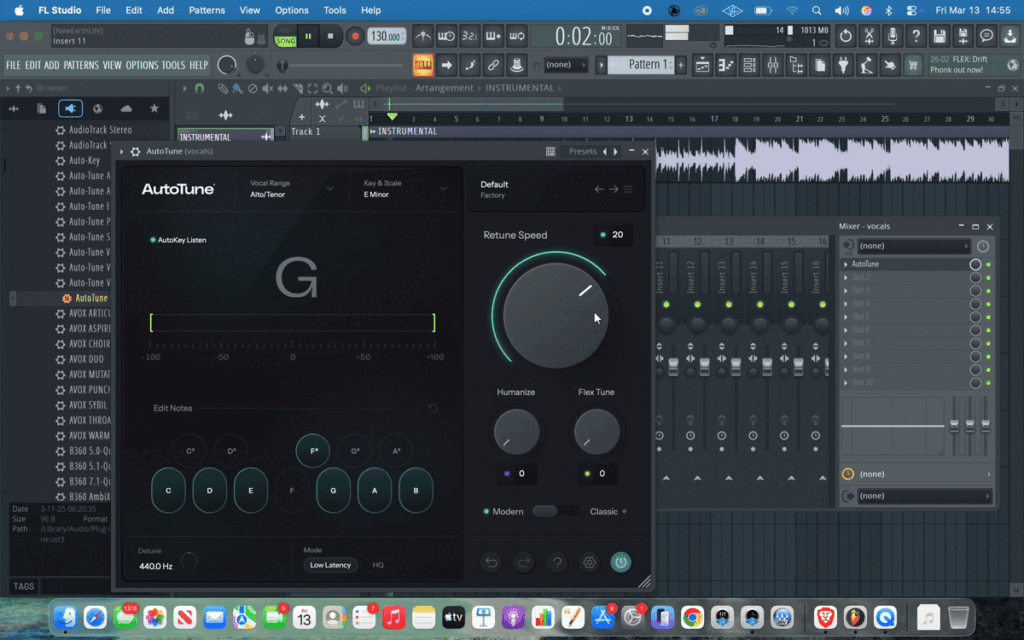
The plugin displays vocal pitch in real time, can automatically detect the appropriate vocal range and allows you to choose the key and scale of your track. You can then control how strongly the tuning reacts using four Re-tune Speed settings. That makes AutoTune Go useful for producers who want to move quickly from a raw vocal recording to something that sits more confidently within a track.
AutoTune Go Makes Vocal Tuning Simple
One of the most appealing parts of AutoTune Go is its simplicity. Pitch correction can sometimes feel intimidating, particularly for producers who are recording vocals for the first time. AutoTune Go removes much of that complexity by keeping the main controls easy to understand.
When a vocal is played through the plugin, AutoTune Go provides a real-time visual representation of its pitch. This makes it easier to see how the vocal is behaving and how the tuning is responding. The vocal range can also be selected manually or determined using Auto Detect. This helps the plugin respond appropriately to different types of voices without forcing new users to understand every technical detail before they can begin.
Choose the Key and Scale of Your Vocal
Correctly setting the key and scale is an important part of pitch correction. AutoTune Go allows FL Studio producers to select Major, Minor or Chromatic scales so that the vocal can be tuned according to the musical context of the track. For most songs, selecting the correct key and scale allows AutoTune Go to guide notes towards pitches that belong within the music. Chromatic mode offers a different approach by allowing access to all twelve notes. If you already know the key of your instrumental, setting AutoTune Go correctly should be one of the first steps before adjusting the strength of the tuning.
Four Re-tune Speed Settings
The Re-tune Speed control determines how quickly AutoTune Go corrects the pitch of a vocal. AutoTune Go provides four Re-tune Speed settings ranging from subtle and natural correction through to faster, tighter tuning. Slower correction can be useful when you want to retain more of the character and movement of the original vocal performance.
Faster tuning creates a more noticeable processed sound and can be useful for modern pop, electronic, hip-hop and other styles where pitch correction forms part of the vocal effect itself.
This gives producers the flexibility to use AutoTune Go as either a corrective tool or a creative vocal effect.
Is AutoTune Go Free in FL Studio?
Yes. AutoTune Go is available to FL Studio users at no additional cost through FL Cloud Free. That is arguably the biggest part of the announcement. Previously, producers wanting official Antares pitch correction would normally need to add another product to their setup. AutoTune Go puts a streamlined version of that vocal-tuning workflow directly inside the FL Studio ecosystem.
For beginners in particular, this makes experimenting with vocal production much more accessible. You can record an idea, apply pitch correction and hear how the vocal works alongside your instrumental without having to purchase another plugin first.
How to Install AutoTune Go in FL Studio
- Installing AutoTune Go is handled directly inside FL Studio.
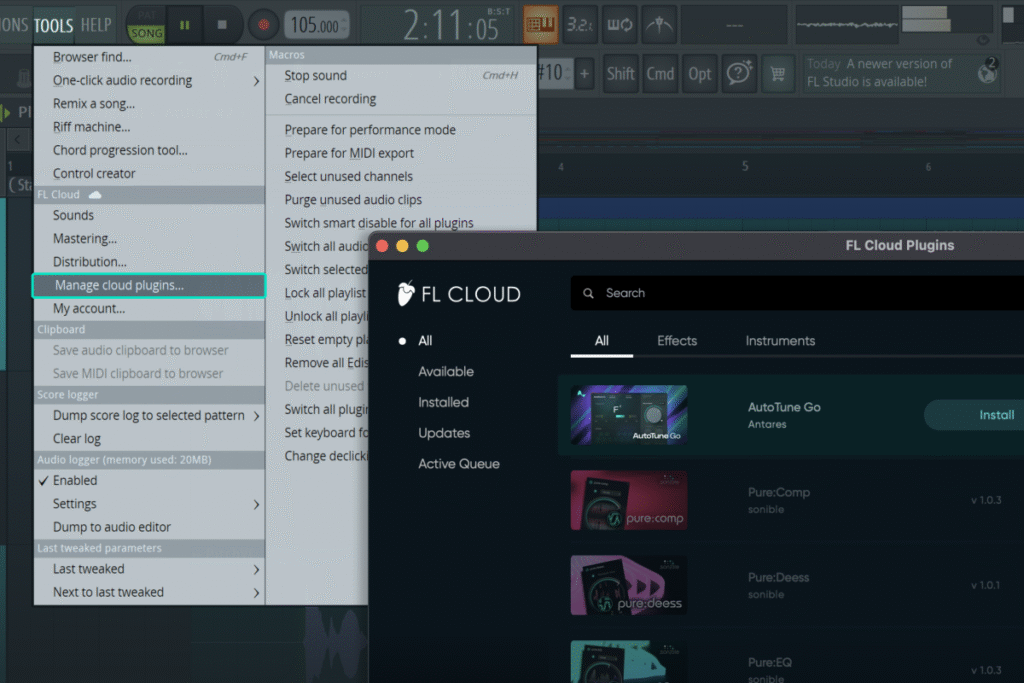
- Open FL Studio and go to Tools > Manage Cloud Plugins.
- From there, search for AutoTune Go, find the plugin in the available list and select Install.
- Once installed, AutoTune Go can be used as part of your FL Studio production workflow.
If the plugin does not appear, make sure you are using a current version of FL Studio and that FL Cloud is available within your installation.
Who Is AutoTune Go Designed For?
AutoTune Go should be especially useful for producers who want quick vocal tuning without spending a long time adjusting complicated parameters. A beginner recording their first vocal can use the automatic detection and simple controls to get started quickly. More experienced FL Studio users may find it useful when sketching ideas, recording demos or applying fast pitch correction before moving deeper into a vocal mix.
It could also be useful for producers who create their own guide vocals and want them to sit more comfortably with the instrumental while writing a song. Because AutoTune Go is available through FL Cloud Free, there is little reason for FL Studio users interested in vocal production not to experiment with it.
AutoTune Go and the FL Studio Workflow
The biggest advantage may ultimately be convenience. FL Studio users no longer have to leave their normal production environment to access AutoTune Go. The plugin is delivered through FL Cloud and works directly within the FL Studio workflow. That makes it particularly useful during the creative stage of production. A producer can record an idea, apply pitch correction, adjust the Re-tune Speed and continue building the track without interrupting the session. Small improvements to workflow like this can make a significant difference when creativity is moving quickly.
For FL Studio users, AutoTune Go is certainly worth exploring because it is available at no additional cost. It provides the essential controls needed for straightforward vocal pitch correction while keeping the interface accessible. The combination of real-time pitch visualisation, vocal-range detection, key and scale controls and four Re-tune Speed settings gives producers enough flexibility to move between natural correction and more noticeable tuning.
It is not about making vocal production complicated. The attraction is being able to get useful results quickly.
AutoTune Go for FL Studio makes vocal pitch correction considerably more accessible to producers using the DAW. By combining Antares vocal-tuning technology with FL Cloud, Image-Line has given FL Studio users a simple way to experiment with tuned vocals without adding another purchase to their setup.
For producers working with singers, recording their own vocals or simply experimenting with vocal effects, AutoTune Go provides a useful new option directly inside FL Studio. And because it is included with FL Cloud Free, you can install it and decide for yourself whether it deserves a place in your vocal chain.
AutoTune Go is available now to all FL Studio users via the free tier of FL Cloud – HERE
Book a session with us at Grn Studios – HERE